Skip to content

CCTV installation — Hisar & Haryana · हिसार, हरियाणा

CCTV planned for what you need to see.

Four cameras at home, a shop entrance or a larger working site. We plan the camera positions, recording, cable routes and phone viewing around what you need to see—then install, configure and show you how to use the system. Across Hisar and Haryana.

Site survey first · written quotation · no guesswork

Coverage
Homes → hotels, farms → petrol pumps
Method
Survey, design, install, handover, support
Area
Hisar and across Haryana
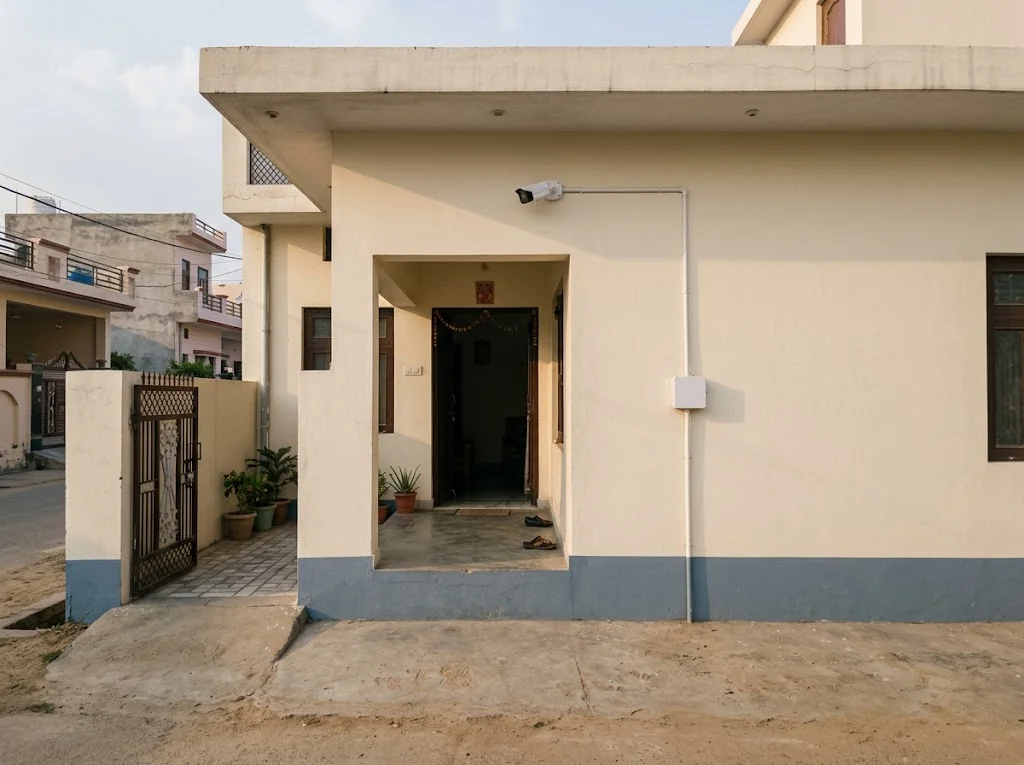
Compact CCTV camera at a modest Haryana home.
  1. 01

    Enquire

  2. 02

    Site visit

  3. 03

    Written quotation

  4. 04

    Installation

  5. 05

    Handover & support

Field experience

The hands on your site have done this thousands of times.

2,000+

cameras installed by our lead installation technician over his career

1,000+

LAN connections in our technician's career experience

Individual career experience brought to GA Applications sites. These figures describe our senior technician's work across his career, rather than GA company project totals.

In context

What a considered installation looks like.

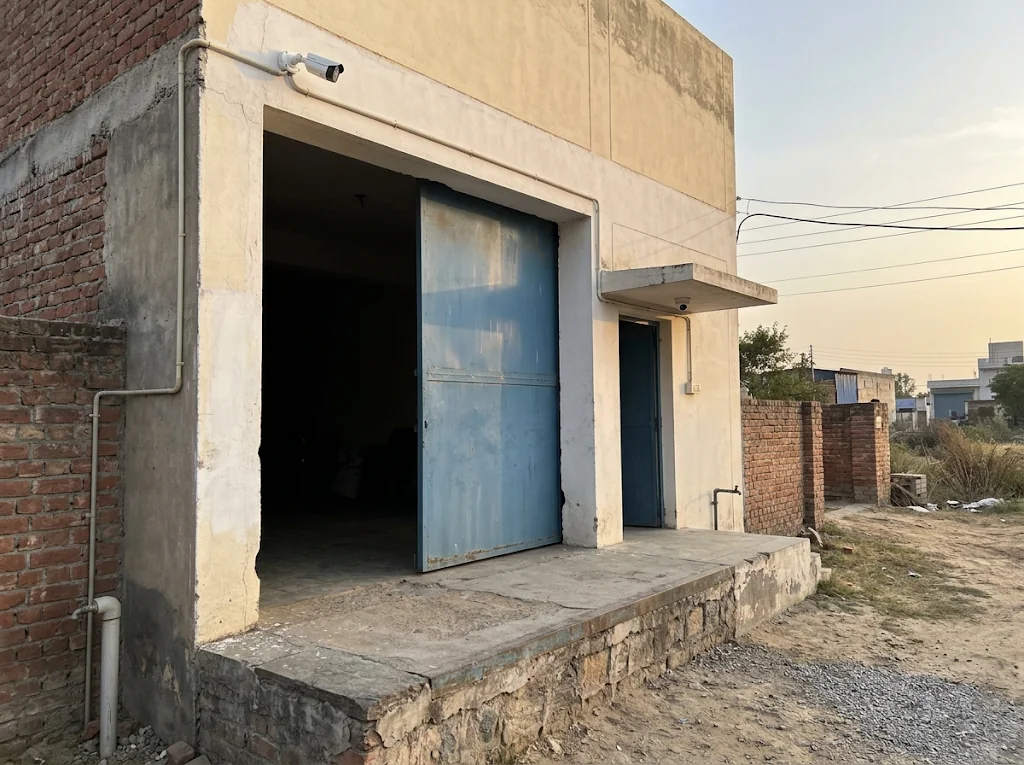
Cameras mounted out of casual reach but low enough to be useful, cable runs in conduit along the wall, a second camera covering the entrance canopy — small decisions that decide whether footage is usable a year later.

CCTV cameras at a godown entrance.

Site planning — interactive

One site, four conversations before any camera is ordered.

Select an entrance, loading area, perimeter or recording point to see the questions we ask before deciding what goes there.

Four interactive site-planning zonesNumber 1 is the entrance, 2 the loading area, 3 the perimeter and 4 the recording or network point. Choose a numbered area or its matching button to see planning questions. The illustration does not establish camera positions or coverage.1234
Representative layout only — actual camera placement and coverage require an on-site survey.

Planning questions

1 · Entrance & gate

  • Q1What must the footage prove — a face, a number plate, or both? They need different heights and angles.
  • Q2Is the camera out of reach, yet low enough to see faces rather than the tops of caps?
  • Q3How does the scene behave at noon (backlight from the gate) and at night (gate lights on or off)?
  • Q4Does the gate itself block the view when it swings or slides open?

Gate cameras are usually the first thing we fix on an existing system — and the first thing we plan on a new one.

Method

What gets decided before we drill the first hole.

This is the substance behind a premium quote: site planning, correct installation, careful configuration, a real handover, and support afterwards. Each item below appears in writing in a GA Applications quotation.

  1. 01

    Day & night identification

    A camera that identifies a face at 2 pm can produce a grey ghost at 2 am. We check each position for both: infrared range against real distance, existing lighting, and backlit scenes like gates against a bright road.

    IR range · WDR · scene lighting

  2. 02

    Camera placement & field of view

    Height, angle and lens decide whether you get a face or the top of a cap. We mark positions on a plan before installation — what each camera must resolve, and what it should ignore.

    Lens mm · mount height · angle

  3. 03

    Recording days

    Retention is a requirement you set — a week, a month, longer — not whatever the disk happened to hold. We size storage from cameras × resolution × days, and write the number in the quote.

    Cameras × bitrate × days → disk

  4. 04

    Cable & conduit

    Outdoor runs in conduit, routes planned to stay protectable and serviceable, joints avoided where they can be and sealed where they cannot. Neat cabling is not cosmetic — it is what survives year three.

    Route plan · conduit · outdoor-grade cable

  5. 05

    Network & power

    PoE where it suits, separate power where it doesn't, switches placed sensibly, surge protection where the site needs it, and a UPS option for the recorder so a power cut doesn't become a blind interval.

    PoE / 12V · switching · surge · UPS

  6. 06

    Remote access

    Viewing on your phones is configured and tested with you — who sees which cameras, on whose device, with passwords you hold. Recording is local and continues even when the internet is down.

    App setup · user access · credentials to owner

  7. 07

    Handover & documentation

    You get a walkthrough, a drawing of what went where, admin passwords in your hands, and a demonstration of pulling and exporting footage. A system you can't operate is a system you don't own.

    As-installed plan · credentials · footage demo

Where we work

One method, very different sites.

The planning discipline stays the same; the questions change with the ground. These are the site types we plan and install for in Hisar and across Haryana.

01

Homes & independent houses

Entrance, approach, parking and the blind side of the plot. Planned so a visitor's face is captured at the door — not just a silhouette on the street.

Typical questions: gate camera height, night lighting, who views on which phone.

02

Godowns & stockyards

Loading shutters, weighbridges, aisles and the yard after dark. Distances are long and light is poor, so lens selection and lighting checks do the real work.

Typical questions: read the carton or count the cartons, retention days, recorder security.

03

Construction sites — temporary poles

Sites change as work advances. Temporary camera poles let us plan around each stage. Power, connectivity, equipment ownership and support are assessed for the site and stated in the quotation; solar, 4G and staffed monitoring require their own agreed scope.

Typical questions: where power comes from, how the recorder is secured, what moves when.

04

Agricultural fields & farmhouses

Approach roads, pump rooms, stores and boundary stretches where people actually enter. Long cable runs and harsh weather are normal here; routes and protection are planned accordingly.

Typical questions: which approaches matter, cable route length, power availability.

05

New-build prewiring

The cheapest CCTV cabling is the conduit laid before plaster. We coordinate with your contractor or electrician so camera points, recorder location and network drops are ready when the building is.

Typical questions: drawings, conduit sizing, future camera positions.

06

Hotels & guest houses

Multi-floor deployments covering lobby, corridors, parking and back-of-house, with recording sized to the property and access split by role. We can plan and execute hotel-scale work across Haryana.

Typical questions: floor-by-floor coverage, retention, who reviews footage.

07

Petrol pumps

Our team's experience includes petrol-pump security work in Haryana. We assess the forecourt, cash cabin and vehicle movements around your operating conditions, then agree the equipment and installation scope for your outlet.

Typical questions: dispenser islands, cash cabin, ANPR at entry/exit, hazardous-area placement.

Every camera position is decided on your site, not over a phone call.

Send a few lines about what you're protecting. We visit, measure, and put the plan in writing before you commit to anything.

Discuss your site

Plan the useful detail

What a camera can show depends on its view.

A wide view can show movement through a scene. A tighter framing may show an action or the detail needed for identification. Useful detail changes with the subject distance, lens, mounting position and light.

Start with what each recording needs to show, and from where. Camera numbers and positions follow that discussion.

Lens
Focal length sets how wide the view is. A wider scene leaves fewer pixels on each person or object.
Resolution
Useful detail depends on pixels landing on the subject, rather than the camera resolution alone.
Height & angle
Mounting height and viewing angle change which parts of a person, vehicle or activity are visible.
Light
Daylight, night and backlight are different conditions. Existing lighting and camera settings are assessed per position.
General scene awareness: a progressively closer view of a generic person.1Action or vehicle detail: a progressively closer view of a generic person.2Close identification area: a progressively closer view of a generic person.3
  1. General scene awareness

    A wider view helps show movement through an entrance or working area.

  2. Action or vehicle detail

    A closer framing can show more of an activity, object or vehicle.

  3. Close identification area

    A deliberately framed area may provide the detail needed for identification, subject to the conditions.

Conceptual comparison, not to scale. These frames do not set a distance or guarantee a result; the useful detail is assessed for each proposed camera position.

Quotations

What a scoped quotation covers.

We don't publish a price list because honest prices come from sites, not spreadsheets. A GA Applications quotation follows a site visit and states, in writing:

No verbal promises. If something matters to you and it isn't in the quote, ask us to add it — that is what the document is for.

  1. 01

    Site visit & measurement

    Distances, mounting points, lighting, cable routes and power — measured on your actual site, not estimated from photos.

  2. 02

    Camera schedule

    Each camera listed with its position, mounting height, lens choice and what it is expected to capture.

  3. 03

    Recording & retention sizing

    Recorder, hard disk and the number of recording days they deliver — as a written figure.

  4. 04

    Cable, conduit & routes

    Materials and the routes they follow, including protection for outdoor and exposed runs.

  5. 05

    Network & power equipment

    Switches, PoE or separate supplies, surge protection and UPS options where the site calls for them.

  6. 06

    Installation, configuration & testing

    Mounting, termination, aiming, network setup, remote-access configuration and a tested handover.

  7. 07

    Documentation

    An as-installed plan and admin credentials in your hands at handover.

  8. 08

    Support terms

    What is covered after installation, for how long, and how to reach us — stated in the quote itself.

Start here

Three ways in.

New installation

A site with no system, or one starting from scratch — including new-build prewiring before plaster.

Survey, plan, supply, install, configure, hand over.

Discuss this →

Upgrade an existing system

Cameras that no longer identify anyone, a recorder that's full in three days, dead positions, or footage you can't retrieve.

Audit what you have, keep what's sound, replace what isn't, re-aim what was never aimed.

Discuss this →

Maintenance & repair

Systems installed by us or by others: faults, dirty lenses, loose runs, recorder and remote-access problems.

Inspection first, then a written scope of repair or upkeep — terms agreed before work begins.

Discuss this →

Support response times, visits and service levels are agreed for your site and written into the quotation or service scope.

Before the survey

Six things worth noting before we visit.

None of this is homework we grade — even rough answers make the site survey sharper and the quotation more accurate. Consented case studies from real GA Applications sites will be published in this space once documentation is complete.

  1. 01

    List the points that matter

    Gate, loading shutter, parking, boundary corners, cash counter — a rough list on paper is enough. We'll measure and refine it on site.

  2. 02

    Note what each point should show

    Movement only, recognising staff, or identifying a stranger? Even a guess helps us choose lens and height the first time.

  3. 03

    Check the site after dark once

    Which lights stay on, which areas go completely black? Night lighting changes camera choice more than any other factor.

  4. 04

    Know your power and internet

    Where the electricity board is, whether there's a UPS, and whether the site has broadband — these decide recorder placement and remote viewing.

  5. 05

    Decide how far back you'd look

    When something goes wrong, do you check footage from yesterday or from last month? Your answer sizes the recording storage.

  6. 06

    Decide who should have access

    Which family members, managers or supervisors should view which cameras — and who should not. Access is configured per person at handover.

Questions

Asked on most sites.

Straight answers, because the honest version is usually also the useful one.

It depends less on the size of your plot and more on what each camera needs to show. A camera meant to detect movement along a boundary can cover a wide stretch; one meant to identify a face at the gate needs a much tighter view at the right height. A site survey turns those requirements into positions — and the positions give you an honest count. Well-placed cameras routinely outperform a larger number of guessed ones.

Tell us what the footage needs to prove. We'll design backwards from that.

Homes, godowns, farms, hotels, construction sites, petrol pumps — the method is the same: survey, plan, install, hand over, support.

Discuss your site

Let’s talk about your project

Tell us what you have in mind.

Share your location and what you need. Send your enquiry directly to our team.

Prefer to call? +91 98124 00866 · maven@gaapplications.com

We use your contact and project details to respond to your enquiry. Privacy information.

Project enquiry details

All fields are required.

For example, +91 98124 00866 or name@example.com.

By sending this form, you share these details with GA Applications so we can respond.