Guided customer intake
Ask relevant questions, explain the next step and pass structured enquiry details to the responsible team.
Business AI by GA Applications
Chinkara Maven helps customers and staff find useful information, provide structured details and move work to the right person. Each project begins with one real workflow, approved sources and explicit limits on what the assistant may answer or do.
Based in Christchurch. Working with organisations throughout New Zealand.
Source, answer, action and human review.
What the work solves
A business assistant earns its place when it reduces repeated searching, improves intake or prepares a reliable first draft while keeping uncertain and sensitive matters visible to people. The use case, source material and handover rules come before the interface.
Ask relevant questions, explain the next step and pass structured enquiry details to the responsible team.
Help staff find answers from approved service information, procedures, policies and internal references.
Create a first draft or structured summary from supplied information while preserving a review step before use.
Summarise permitted record history, prepare follow-up context and direct users to the underlying customer or job record.
Define measures, describe visible changes and help a user locate the source records behind a result.
Recognise agreed uncertainty, sensitivity or risk conditions and route the matter to a named person.
What can be included
The first release is scoped around one workflow that can be tested with representative questions and example records before broader access is considered.
Users, purpose, allowed tasks, excluded decisions and success measures recorded in plain language.
Approved sources, owners, review dates and conflict rules documented before answers are tested.
Questions, required inputs, response structure and human handover designed around the chosen job.
Permissions, approval points, refusal conditions and sensitive-data boundaries agreed with the business.
Relevant form, inbox, CRM, document or dashboard handoff configured and tested within scope.
Representative tests, issue logging, content maintenance and ongoing responsibility handed to named people.
Working method
The project separates a convincing demonstration from a dependable business release. Example data proves the interaction first; approved access and operating checks come later.
Select one repeated question, intake journey, document task or knowledge lookup with a clear owner and outcome.
Gather approved sources, define access, resolve conflicting instructions and write the escalation boundary.
Test representative, unclear and out-of-scope requests using example information and recorded expected behaviour.
Connect approved systems carefully, monitor real use and review answers, handovers and source changes with the owner.
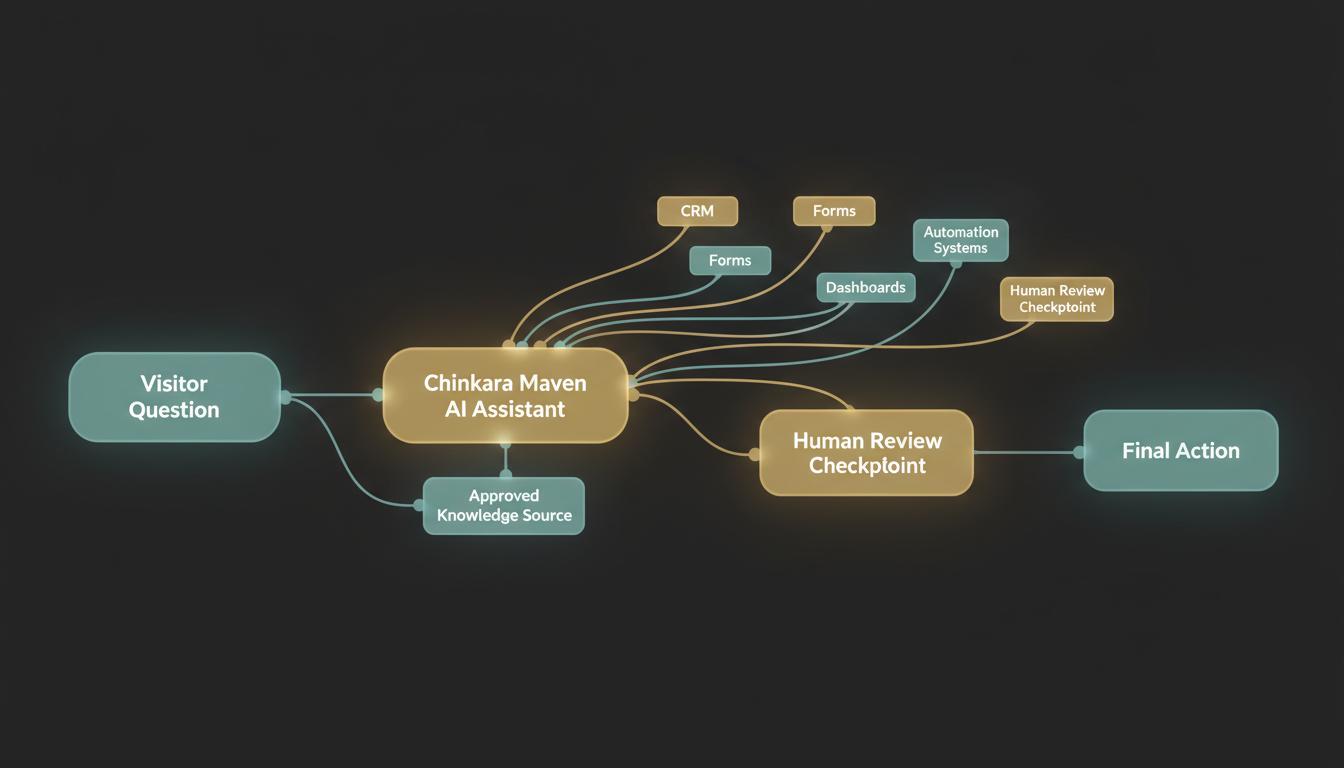
A closer view
A useful response should reveal where its information came from, what it still needs and when a person must take over. The assistant interface is only the visible part of that controlled path.
Questions answered
These answers set a practical starting point. The written project scope confirms the exact responsibilities, systems, access and commercial terms.
A sensible first release handles one bounded task such as website enquiry guidance, internal knowledge lookup, document drafting or CRM record summarisation. Narrow scope makes testing and ownership clearer.
The work starts with approved business sources, a defined user job, explicit refusals and a named human handover. The visible chat or task interface follows that operating model.
It can organise information, ask questions and prepare material, but legal, financial, employment, medical, safety, engineering and other consequential decisions remain with appropriately authorised people.
Only within an agreed deployment with suitable platform controls, permissions, retention expectations and review. Public demonstrations should use example or approved non-sensitive information.
Potentially. Each source and destination needs its access method, permitted fields, failure handling and responsible owner confirmed before connection.
Scope depends on the workflow, source quality, interfaces, access controls, evaluation and support required. GA Applications provides a written proposal after those inputs are understood, with third-party service costs identified separately.
Start with the real requirement
Share the current process, system, website, spreadsheet or customer journey. We can identify a sensible first stage and set out the scope before any build is approved.